Instruction for Students
Each students has been assigned with separate user name and password. By using this user name and password students can login to their Laptop.
Linux Server Access:
Each user has been allocated with Ubuntu Server 18.04 Instance with root access, The user name and password has been given separately to students. If not please contact training coordinator or Service Desk
Linux Server can be accessed by following Steps:
Step 1: Go to Start and Type putty
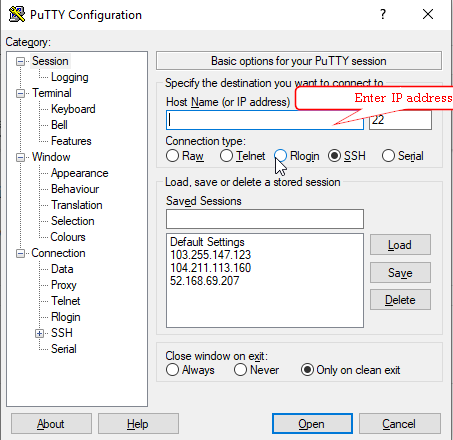
Step 2: Enter the Domain Name (username.training.sageit.me) of Linux Machine which is allocated to you.
Example:
If trnusr1 tries to access Linux machine , he/she has to enter trnusr1.training.sageit.me
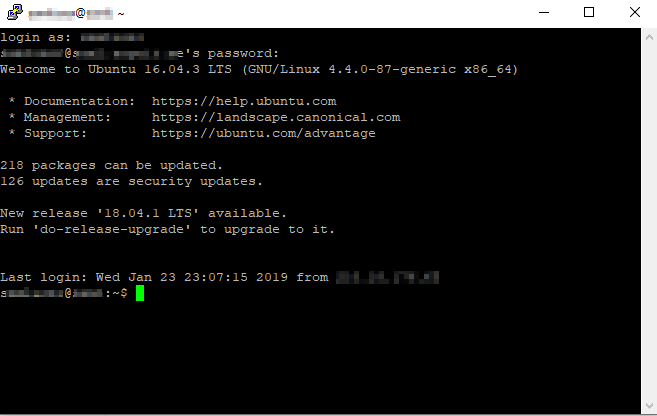
Step 3: After login you will get a screen like below, in that screen Enter the Username and Password which is given to you.
For Any additional requirement for Instance or Server, please contact service by clicking here
VPN:
Each Student laptop has been configured with VPN connection, so that they can access the Linux machine even outside of the office.
Additional features for Trainers
Trainers having additional features to collaborate with students by using multi point service.
Access Multipoint Service:
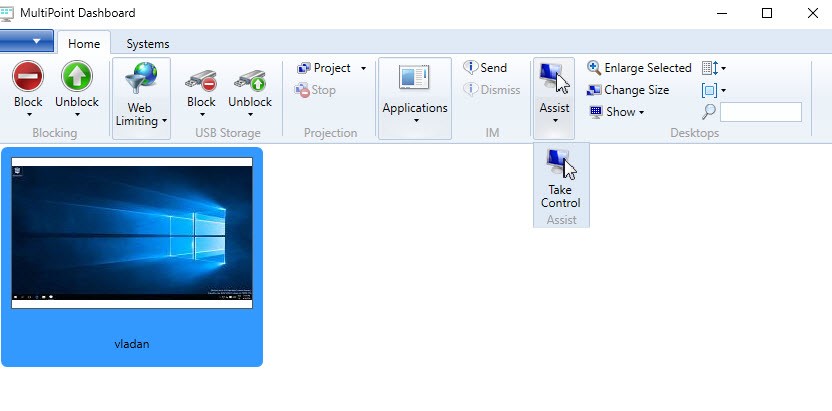
- All students are listed in dashboard. Trainers can help students by taking control of students laptop.
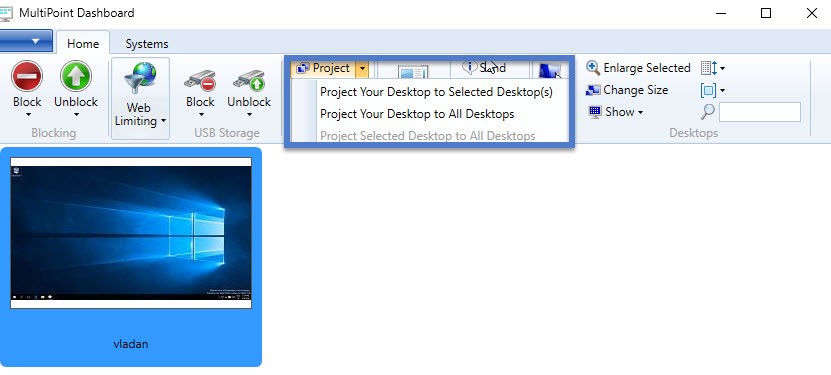
- Trainers able to project their desktop/Laptop to particular students or All students.
For more details about Multipoint see the video below