Sage IT Chat Client Application
Sage IT Client Chat application is an Instant Messaging application.  This application having inbuilt features like private chat and group chat.
Procedure to install the Sage IT Client Chat Application:
• Download the Sage IT Client Chat Application from the below link.
• URL: http://mydocs.sageit.in/public/sage_it_chat
• Install the Client Chat application by accepting the installation wizard.
• Open the Sage IT Client Chat application,
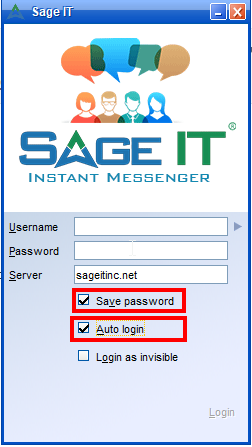
• You will see the login page of Instant messaging chat application.
| SAGEIT.ME USERS | OTHER USERS |
| USERNAME: Use Your email id without ” @sageit.me ”
PASSWORD: Use your Email Password SERVER NAME: sageit.me Example: support@sageit.me
|
USERNAME: Use your mail id without “@domain.com”
PASSWORD: The password has been given by IT Team, If not please contact servicedesk SERVER NAME: sageitinc.net (which is common for all user) Example: servicedesk@sageitinc.net
|
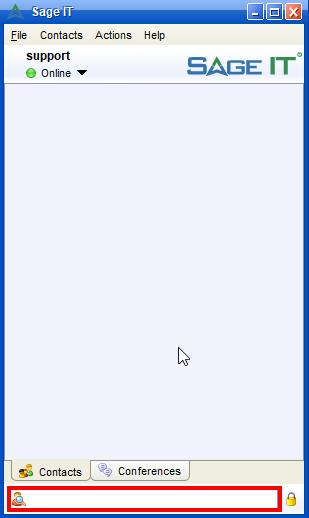
• After successful login the login page will be like this.
• It will display the user directory list.
SEARCH AND ADD CONTACT
• Searching for people: By entering the user name in a column having search option.
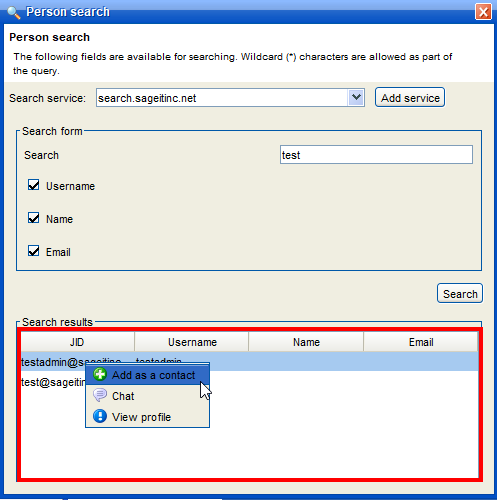
• After entering the username, it shows the result, whether the user is in contact or not.
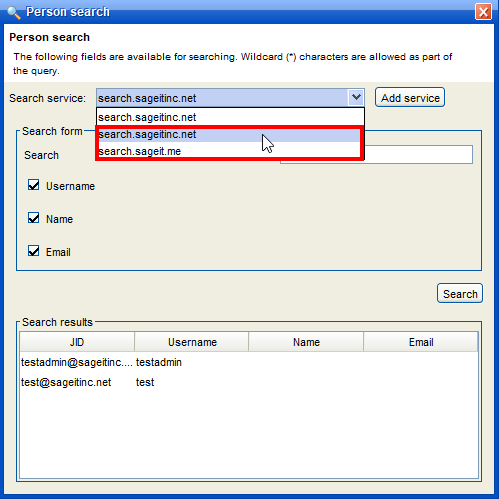
There are two search services are available, one is for Sage IT.ME users and another one others users.
For Sage IT.ME Users: Add the search service by selecting the ” Add Service ” and enter the Service name as “search.sageitinc.net” and Click OK.
For Others Users: Add the search service by selecting the ” Add Service ” and enter the Service name as “search.sageit.me” and Click OK.
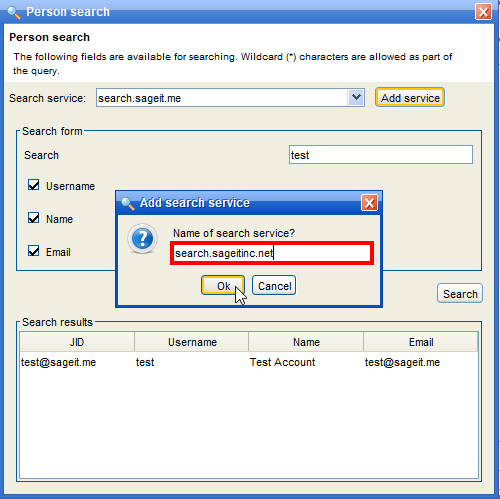
Now the search service for sageitinc.net and sageit.me has been added, now user can able to search users.